Saturday, 31 March 2012

Test Drive The Google Drive In April!


What’s Google Drive?

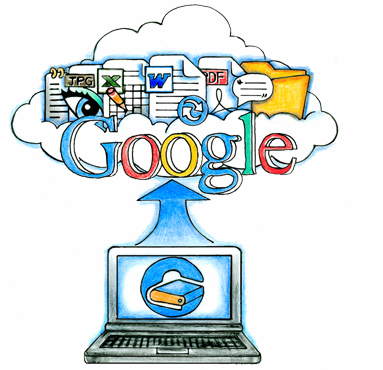
Google Drive (not to be confused with Google’s existing internal Gdrive project, code-named Platypus) is a web application to allow Google users – those with a Google account – to store their files, accessible everywhere. Let’s hand out 100 Gigabytes for starters, just to have some wow factor like when Gmail was released (and like Gmail, Google Drive ought to start out as invite-only Beta).
Other potential product names for this service are e.g. Gdrive, Google Files, Gfiles, Google Store, Google Zone, Google Data, Gvault, G:\, or Google Storage.


Google Drive also known as GDrive may appear during April of 2012. Google drive is an online file storage system from Google and it has been in the limelight from 2006 onwards.

Mr. Om Malik , who is the founder of GigaOm, is pretty confident that the Google Drive would subsequently appear in the April of 2012. He said that he got this information from “well placed” sources. He is still in a bit of a doubt as the history of Google Drive system has not been very good in terms of punctuality.

There have been many years since the time we have been hearing about the Google Drive. The first time when Google Drive became famous was in 2006 when first rumors about it emerged through the Wall Street Journal.


As of now, there is no official date given as the launch date of Google Drive, but there are chances that it might be released during the first week of April, 2012. Google on the other hand have not spoken anything about the whole story and they are keeping quiet and don’t like to comment on any of the rumors heated up so far.

According to the sources that Mr. Om has, Google would be giving out 1 GB of free online storage to everybody, but would charge certain amount for additional storage space required.  Currently the world leader in storage space – Dropbox, provides 2 GB of free online storage space to interested users. The Google Drive will function in a similar manner as the Dropbox having the architecture of local client machine and an online web interface.

The Google Drive will be having the looks as shown in the screen shot above. The screenshot is a leaked image that is all over the place. Google is keen on keeping consistency in terms of look and feel across all its services so we expect the look of Google Drive to be something like Google Docs service. One more thing that is really exciting is that, that Google Drive would be available for Google Docs services. It would also be specific to a domain.

We expect that the whole process of sharing files would be given a new dimension with the launch of Google Drive. We are eagerly waiting for the Google Drive services to be launched by Google as soon as possible.


Saturday, 24 March 2012

Are You Ready For Angry Birds Space!


So finally, one of the most awaited game of the year for your mobile device is here! Arguably the most played game worldwide – Angry Birds is back with a new edition which is known as Angry Birds Space. Rovio, the developer of the game had a couple of months back announced that they were working on such a game and ever since, there were a number of talks while the world eagerly waited for the launch of the application. 

Rovio, today released Angry Birds Space on both the Apple Store and the Android market which is now known as the Google Play market. As was expected, the game is paid and will cost you differently.

The iPhone/iPod Touch version is on sale now for $0.99
The iPad HD version is on sale for $2.99
The Android version is also out and is  selling for $0.99
The Mac version is selling for $4.99

The game is marked by new characters and is expected to be the best one in the series yet. That’s what the developers had to say about the game so we too expect something great and amazing in this game. The new installment Angry Birds Space has 60 levels and more will be added by subsequent updates. It includes several new game elements including gravitational fields, new birds as well as a new power-up – Space Eagles – which can be earned by playing or bought as an in-app purchase. More hidden goodies, secret levels and cool space content are also available as in-app purchases.

Here is the video that people at Rovio, the developers of the game developed for the introduction of the new game- Angry Birds Space

Angry Birds Space comes after Angry Birds classic, Angry Birds Seasons which included a number of games and Angry Birds Rio.
We expect the game to be yet another amazing inclusion to Rovio’s widely played mobile game. 


Thursday, 15 March 2012

Become A Part Of Delhi Police With Android


Delhi Police has recently launched an official feedback app for all the citizens of Delhi. This is a major initiative taken by Delhi Police to reduce the crime that happens on a day to day basis.
Delhi police feedback app citizen first now report crime as it happens to the police
With this app, any citizen can report feedback, concerns etc directly to the Police Station Head Officer. The response given through this app, goes directly to the nearest Police Station Head Officer in the circle from which the feedback is given.
This app can help police to trace down criminals as data can be sent to Police directly while the crime is happening. Data can be sent in the form of text, images, video etc to the Police which would help Police in providing better security to the citizens of this country.
The data which comes to the Police from citizens using this app, gets stored on the police phone directory. Automatically, the crime data is reported with the GPS location. The location can also be modified by citizens manually if they want to and then this data is sent to the nearest Police Station.
Delhi police feedback app citizen first download link features how to use features options menu navigation
This is a great system introduced by Delhi Police to reduce crime in Delhi. Many of the crimes do not simply get recorded because people do not have enough proof to say that a particular crime happened with them. But with the introduction of this kind of applications, any crime can be recorded or pictures of the crime scene can be sent to police while the crime is happening. This would greatly help police in tracking down the criminals and reduce the overall crime rate in the country.
We would like to praise Delhi police for taking such steps to secure the citizens of the country and making every possible way to try to help the common people. It is steps like these that would help police earn the respect of common man. Police forces in India work very hard for their duties but all the hard work that they put in are overshadowed by corruption in this country. We hope that introduction of this application would help Delhi Police earn some respect in the hearts of people of Delhi.

Features of the App Launched by Delhi Police – Citizen First

  • The user can attach an image along with the report.
  • The reported Feedbacks will be actioned upon.
  • The citizen can report mishaps according to the various categories, and the reports are directed to the local Station Head Officer.
  • The data is taken from GPS or it can be manually entered.
Download Link :https://play.google.com/store/apps/details?id=com.mindhelix.delhi.police

Wednesday, 7 March 2012

Wear Your Computer Mouse In Your Hand! :Ion Air Wireless Mouse


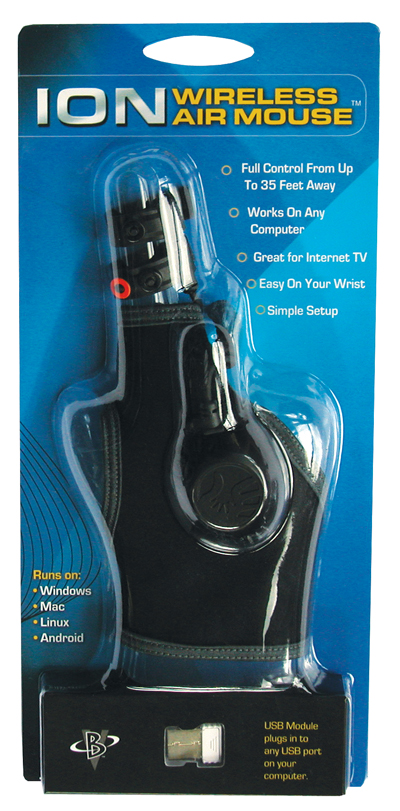
Ion Air Wireless Mouse is a futuristic design that is worn like a glove common and allows us to use all the functionality of a wireless mouse using only our movement, because the screen cursor moves through the movement of our hands, more much like the one worn by Tom Cruise in Minority Report.


Ion Wireless Air Mouse  looks like a soft glove and plastic adherent, but light and comfortable with what is said in the video review that I’ve shared in depth article, and, as you can see in the picture detail, consists of two basic elements:
The dock housed in the upper part which houses the power buttons, the connector type mini USB which serves to recharge the battery and the LED that indicates the operation, which then connects to
Second device that slips directly on the other hand ‘ index and is equipped with three buttons (which represent the three main functions: the left and right mouse button and a pause button) that are activated at the push of the thumb
Before wearing the Air Wireless Mouse you install on your PC and then every time a clear start small softwarethat will track the external device, once made ​​these two small steps you can wear it and start to take their firststeps with your new device, whose operation is guaranteed up to a distance of ten meters from the computer.
Ion Air Wireless Mouse is sold at a figure all in all quite affordable, return to hand about 60 euros (79 dollars), an example that can occur in the video report below, I must say that for normal use and common PC probably This device is not a priority, but it may be interesting in some areas or for some uses.

Sunday, 4 March 2012

Carry Your Pen Drive In Your Purse As A Card!

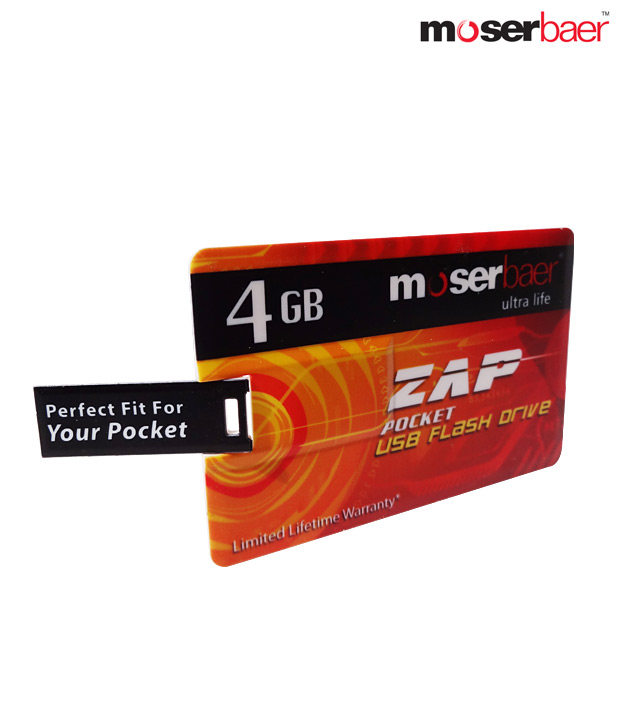
Moser Baer has launched a USB flash drive in the form of a credit card and named it as Zap. It is a new design that would be helpful for the consumers to carry around in the pocket or in their purse along with several other debit or credit cards.

Zap has a capacity of 4 GB and it is very easy to carry. The price for which this device is quoted is Rs 1100 (INR) but you can get this USB flash drive for a price of Rs 399 on the Moser Baer website.


Specifications And Features of Zap Pocket USB Flash Drive
  • Weight: 10.25gm
  • Dimension: 54.15*52.83mm
  • Capacity: 4 GB
  • Warranty- Limited lifetime warranty of 2 years
  • Interface USB 2.0
  • Plug and Play
  • System requirements: Windows ME/2000/XP/Vista/Mac OS 9.0 or later, Linux Kernel 2.4.2 or later, Desktop or Notebook computer with USB port.
The flash drive designed in the form of a credit card is a great design and though out product. Specifically for men, it would be very useful to carry it around all the time in their purse. You can use it whenever you want by just caring it in your wallet.
For a price of Rs 1100/- this device seems to be little expensive but you can still avail this USB flash drive for a price of Rs 399/- for a limited period from the website of Moser Baer. So, you can still try this product for a cheap price if you really want to try something new.

Thursday, 23 February 2012

Take Your Android To Your PC With BlueStacks App Player!


Ever played a game or used an application on your mobile device that you wish existed for your computer/laptop as well?
Well, if you are an Android users, which has a market place filled with millions of applications, some of them so good that we too have also felt that it would have been awesome if we were able to run the same applications on our PC. To quote a couple, Fruit Ninja, Angry Birds and a few others have been our all time favorite that we have always wished to play on our PCs.
01 BlueStacks Run Android Applications on your PC : BlueStacks App Player tech reviews  version spotlight Player phone Draft custom apps Cloud Auto application Android apps android
So here is an application which, well, we wouldn’t term it anything less than revolutionary. An application has been developed that lets you run Android application without doing any changes to your system OS! The alpha version of its App Player — software that allows users to run a host of Android apps on Windows PCs, tablets or desktops, without requiring them to make modifications to their original OS.  It features 10 pre-loaded apps along with an option to add custom apps. You can either download new apps from the BlueStacks Channel or push your favorite apps from your Android phone to your PC via BlueStacks Cloud Connect.
Even though the Alpha test version of the app player has been called off for now and one can expect the beta version to be available anytime soon but if you are one of those who loves to ‘try’ things out before they are officially available, here is the alpha version of the App Player which, as stated, will let you use 10 pre loaded apps and a few custom apps which is supports as of now.
A great feature of this application is that you can push the apps from your Android device to your PC by using the BlueStacks Cloud Connect option. To use BlueStacks Cloud Connect, you must first install the BlueStacks Cloud Connect app on your phone from the Android Market. Once done, open the Cloud Connect page on your PC’s browser to receive a Phone PIN. Open the app on your phone, enter the PIN and tap OK. You should now be able to see a list of all your apps inside BlueStacks Cloud Connect. Check the app that you want to push to your PC and tap Sync.
BlueStacks App PlayerU A 310834 13 Run Android Applications on your PC : BlueStacks App Player tech reviews  version spotlight Player phone Draft custom apps Cloud Auto application Android apps android
All in all, this is one application that you should surely try out. Even though the application was only in its alpha version, it showed a lot of promise letting you run applications without much issues. Hence, expectBluestacks to come up with support for many more applications and make your desktop your next Android home!
Amazing application. A must try for all.
In the end, here is a video by the developers of the App Player that lets you run Android applications on your PC!

Monday, 13 February 2012

2012 The Gaming Year: Top Games In 2012

Gamers and the rest, get happy because this is going to be a happy and eventful year for us. There are some super exciting games to look forward to this year and some of the most awaited ones are listed here. This is a pick of our favorite one’s


HALO 4:


Halo 4 has been kept under wraps more or less but from the trailer what’s obvious is that there is some high action drama, a superb story line and top notch multiplayer gaming. Also, it features Master Chief and Cortana although these two are the only ones shown as of now; these are the only ones the audience cares about. It is speculated that the game will be out in the fall of 2012. This being the first of the three new part series, and considering that the efforts of around 343 industries within Halo have gone in, the company is leaving no stone unturned for making this really big.


GTA 5- 2012:


It is undoubtedly the most awaited game of the year. Even before its release, GTA 5 has managed to cook up a storm that is refusing to settle. A well received feature of the game, the planes, are back and the map this time is huge but not empty like last time. This time its going to be Los Santos and its country side filled with crazy things to do and lots of fun. “It’s Los Santos and the surrounding countryside – and a very big map” said an official from Rockstar games.


FAR CRY 3:


Not as if the last two games of Far Cry were easy, the third edition is trying two combine the package of the first and second and in the process it is achieving a real tension and fire effect providing ability. The second game itself is so difficult that its getting hard to get through and the fire effects are so realistic it just completes the experience.


HITMAN ABSOLUTION:


Now we have to agree that for a series that has been going on for six years now, this game has been long overdue. The Hitman games give the player a Bond like feeling and the player can actually choose the way in which he wants to execute his kill. You can either don the disguise of a friend of the target or kill them stealthily or you can go all guns blazing and knock everyone out. The new game is rumored to have more for the gamer in terms of missions to be completed.


THE LAST OF US:


Now this game is a survival horror game and many will say that there are plenty of such games in the market. But, what sets this one apart is the style of the players and the incredible graphics that it displays.


These are just some of the games waiting to be launched on your Playstation or Xbox. Others include titles like Mass Effect 3, BioShock Infinite, Max Payne 3, Luigi’s Mansion 2, Alan Wake’s American Nightmare. Hardware upgrades like Playstation Vita and Wii U will also be launched this year.


Sunday, 12 February 2012

Alan Wake’s American Nightmare Game For X-Box :Preview

Game: Alan Wake’s American Nightmare
Developer: Remedy Entertainment
Genre: Third-Person shooter, action game, Psychological thriller
Platform: XBox Live Arcade
Release Date: 22nd February, 2012


Alan Wake’s American Nightmare is an upcoming story-driven action-horror video game, being developed by Remedy Entertainment. Published by Microsoft Studios, the game is not a sequel to to its predecessorAlan Wake, but is rather a downloadable follow up which only exists to broaden the universe of the game.Alan Wake’s American Nightmare is set as an independent game and does not reflect on the major storyline of the franchise. Remedy Entertainment has clearly stated that this is not in any way the last game of the series and a proper sequel Alan Wake 2 is in works. 

The game will follow the story of Alan Wake who seems to be stuck in Arizona. Even worse, he seems to be inside one of his Night Springs episodes he wrote earlier in life when writing for the show. Whilst he uncovers a mystery of his own, he is caught between a battle of light and dark, whilst he reflects on the borderline of reality and fiction.


The game is scheduled for a release later this month (22nd February) and will be available for download from XBox Live Arcade.
Here we leave you with it's trailer...


Tuesday, 7 February 2012

Install Windows 8 With A Stick!


Microsoft released the first Windows 8 Developer preview free. We are posting guide on how to install Windows 8 using USB it’s available for every one.

First You Will Need:
  • Windows 8 ISO – Developer Preview [Download]
  • Windows 7 USB/DVD [Download] – This is the official Microsoft tool for creating bootable DVD or USB device of Windows 8
Here is how to make a Windows 8 Bootable USB Stick:
Step 1: Install Window 7 USB/DVD tool and open it, Browse the Windows 8 ISO which you downloaded earlier and click next.
01

Step 2: In the second step select USB in creating bootable image.

02
Step 3: Plug in USB and browse the USB as shown in picture below to create bootable Windows 8 drive, now click begin copying:
03

Step 4: That’s it Windows 8 files will now be copy to usb in the form of bootable image.

04
Step 5: Now simply restart your computer and boot the computer via USB drive to begin installation of Windows 8.
Try today!

Thursday, 2 February 2012

SmartRoute Contacts: An App Bringing Together Twitter , Facebook And Other Contact Information In One Profile!


Platform- iOS, Android, Chrome Extension
Cost: Free
Smartr Contacts, as the name suggests is a contact manager application for your mobile device as well as your gmail on your laptop or PC. Essentially, Smartr Contacts pulls contact and calendar information from your Google account, sorts everyone, adds a picture to their profile, and tries to make sense of why you’ve contacted them in the first place. You can also log in to social media sites like Facebook, Twitter, and LinkedIn to see more detailed information about your contacts. Otherwise, you’re limited to three of the four tabs available whenever you choose a contact. Basically, the more information you provide it, the smarter the app gets. The more you use it and interact with your contacts, the better it will rank your contacts. When you first sign up for the app, however, it has a pretty good idea of who your most used contacts are. 
What smartr contacts does is that it allows you to effectively manage all your contacts and it does so by integrating your different contacts from different social media accounts as well as Gmail in one single place. The contact entries are quite detailed with four informational tabs: Details, Social, History and Common. It shows a picture of that person (either their Facebook photo or Google Account photo) at the top and indicates whether they’re part of the Top 10 or not. The Details tab shows phone numbers as well as e-mail addresses they use with their various accounts. Social shows their social networking activity and history shows your call, text and e-mail history. You also get a neat little graph at the top of the tab showing the frequency of contact. You can see the friends you have in common with them on the History tab.
For those of you who are students of technology will be able to relate this application to something that was released a few time back. We are talking about the integration of all the contacts in Windows Phone Devices which does pretty much the same thing. Places all your contacts in one place and provides you with a detailed history from all the accounts you are linked with to that person. 
So smartr contacts provides you with that one big USP that Windows Phone devices would have thrived on or rather are thriving on! The fact that it is a cross platform application i.e. available for your gmail, Android and iOS (still in beta) devices, it helps you manage all your contacts effectively. For those of you wondering how it does that cross platform, you have to create a ‘xobni’ account (the developer of the application) so that the contacts are saved on the cloud and retrieved every time you login from a different device. 
The fact that this application stores up to 10,000 contact entries and manages them very effectively, lets your integrate all your accounts (we say all for gmail, facebook, twitter and linkedin are what most people use nowadays), it is one of the better contact management applications that we came across. 
All in all, Smartr Contacts definitely gets smarter as you use the app and surely manages your contacts pretty effectively and efficiently. We give it a 4.5/5 from us at OP. We  cut the half for it would have been much more effective had it let users integrate contacts from other email and social media clients as well. Still, a must have contact manager for your device!
Let us know how you feel about this app!